Introduction to Telegram Account Deletion
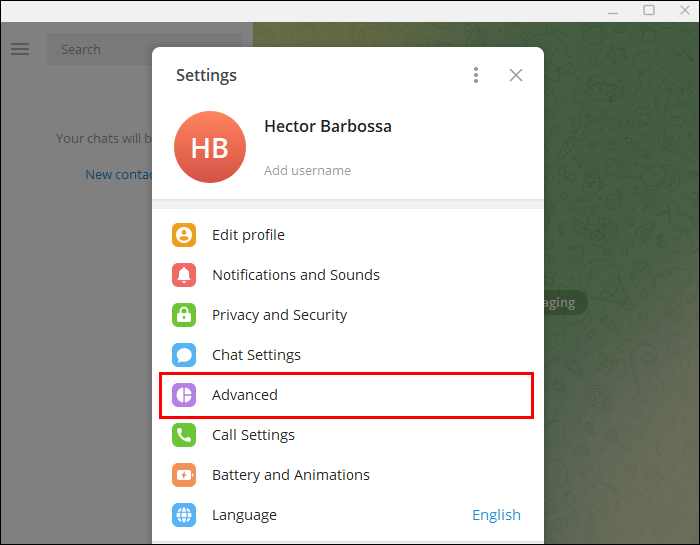
Hey there! If you’re considering deleting your
Telegram account, you might be wondering what happens to your data.
Telegram is known for its privacy features, but the process of account deletion can be a bit tricky. In this post, we'll explore what account deletion means for you and your data, and why someone might choose to take this step. Let’s dive in!
Reasons for Deleting Your Telegram Account
There are several reasons why people decide to delete their
Telegram accounts. Understanding these motivations can help clarify your own choices. Here are some common reasons:
- Privacy Concerns: Many users are becoming increasingly aware of their online privacy. If you feel that your data might be at risk or misused, deleting your account could be a way to protect yourself.
- Overwhelming Notifications: Telegram can be a busy platform, with messages and notifications coming from various groups and channels. If the constant notifications become too much to handle, a clean break might seem appealing.
- Seeking Simplicity: In a world full of social media, some users choose to simplify their lives by reducing the number of apps they use. Deleting Telegram can be part of a broader effort to declutter digital spaces.
- Switching Platforms: Perhaps you've found another messaging app that fits your needs better. If it offers features you prefer or a friendlier user experience, that might prompt you to say goodbye to Telegram.
- Inactivity: If you haven’t used your account in a while, you might question its value. Deleting an unused account can be a way to streamline your digital presence.
Each of these reasons is valid and reflects personal choices and circumstances. Whatever your reason may be, it’s important to consider both the implications of deletion and what you’re leaving behind.
3. What Happens When You Delete Your Telegram Account?
Deleting your
Telegram account might feel like a big step, but it's essential to know what exactly happens during this process. First off, when you choose to delete your account, it’s not just a temporary action – it’s permanent. That means once you hit that delete button, you can’t retrieve your account or any of the data associated with it. Here’s a breakdown of what occurs:
- Immediate Deactivation: The first thing that happens is your account gets deactivated. You won’t be able to send or receive messages, and your profile will effectively vanish from other users’ contact lists.
- Data and Chats: All your chats, including groups and channels, will be deleted. This means that any conversations you've had, files you’ve shared, or media you’ve exchanged will be lost forever. So, if there are precious memes or important info in those chats, make sure you save them before you delete your account!
- Groups and Channels: If you were the admin of any groups or channels, you would lose your admin status, and the group will continue without you. Members might still see your messages until the system fully processes your deletion.
- Contact Visibility: Your contacts will no longer see your account. If they search for you, they won't find you listed among their contacts.
It’s worth noting that
Telegram offers a self-destruction feature where your account can be deleted automatically after a period of inactivity. This could be set for 1 month, 3 months, 6 months, or even a year. If this is something you’ve opted for, you’ll still have a chance to regain your account if you log back in before the time expires.
In summary, deleting your
Telegram account is a significant move that leads to the irreversible loss of your data and contacts. If you’re sure about your decision, go ahead – but make sure you’ve backed up anything important!
4. The Impact on Your Data After Deletion
Now, let’s talk about the aftermath of deleting your Telegram account and the fate of your data. It's crucial to understand the implications of this decision, especially if you’ve been using the app for a while.
When you delete your account, you might be wondering: what happens to all that data? Here’s the scoop:
- Complete Deletion: As mentioned before, once you delete your account, all of your messages and media are gone. Telegram doesn’t keep a backup of deleted accounts; this ensures your data remains private and is not accessible to anyone, including Telegram itself.
- No Recovery: If you think you can just log back in and retrieve your old messages, think again! Deleted accounts and their data are permanently erased from Telegram’s servers. This is a crucial distinction from some other social platforms, where data might linger even after account deletion.
- Privacy Considerations: Deleting your account can be a powerful way to protect your privacy. If you’re concerned about who has access to your information, this is an effective route. Once deleted, there’s no trace of your personal data left behind.
- Third-Party Data: If you've shared your Telegram data with third-party apps or services, remember that deleting your account doesn't automatically remove that data from those services. You may need to reach out to them separately to ensure your information is deleted.
In conclusion, the impact of deleting your Telegram account is significant and final. So, if you have any lingering doubts, take some time to consider your options. Backing up your chats and files can save you from losing important memories or information. Remember, once it’s gone, it’s gone!
5. Restoring Your Account: Is It Possible?
So, you’ve decided to take a break from Telegram or maybe you accidentally hit that delete button. Now, you’re wondering, “Can I get my account back?” The answer isn’t straightforward, but let’s break it down.
When you delete your Telegram account, the platform immediately starts the process of removing all your data from their servers. However, if you’ve merely deactivated your account rather than permanently deleted it, there might be a chance for restoration.
Here’s how it works:
- Deactivation vs. Deletion: If you deactivate your account, it's like putting your account on pause. You can log back in, and voila your chats and groups will be there, just as you left them.
- Permanent Deletion: If you chose to permanently delete, things get trickier. After a waiting period (which can be up to 30 days), all your data is wiped from Telegram’s servers, and there’s no way to bring it back. Think of it like a garden you can stop watering it for a while, and it stays green, but once you pull it out, it’s gone for good.
If you find yourself in a situation where you need to restore a deactivated account, simply log in with your phone number. If your account was deactivated but not deleted, you’ll be back in business! Just be ready to go through the verification process.
For those who have permanently deleted their account, all hope is not lost! Consider reaching out to Telegram support, but remember, the chances are slim. They might offer sentimental words but little else.
In summary, if you’re thinking of leaving Telegram, take a moment to consider whether you want to deactivate or delete your account. With deactivation, you have a safety net; with deletion, it’s more like leaping off a cliff without a parachute!
6. Best Practices for Data Privacy on Telegram
Now that we’ve tackled the fate of your data when you delete your Telegram account, let’s pivot to something equally important: how to keep your data safe while using Telegram. Here are some best practices to protect your privacy.
- Enable Two-Step Verification: This is a must! By activating two-step verification, you add an extra layer of security to your account. Even if someone gets hold of your password, they’ll need that second verification code to access your account.
- Use Secret Chats: For conversations that require a bit more privacy, switch to secret chats. These chats use end-to-end encryption, meaning only you and the recipient can read the messages. Plus, you can set messages to self-destruct after a certain time!
- Be Cautious with Links: It’s easy to click on links in messages without thinking. Be wary of unknown senders or suspicious-looking links that might lead to phishing sites. Always double-check URLs.
- Manage Your Privacy Settings: Dive into your privacy settings and customize who can see your phone number, profile photo, and last seen status. A little customization goes a long way in protecting your personal information.
- Regularly Review Active Sessions: Telegram allows you to check where your account is logged in. Regularly review this list and log out of any suspicious sessions. This way, you can ensure that no one else is snooping around!
By adopting these practices, you can use Telegram while keeping your data privacy in check. Remember, it’s always better to be safe than sorry! After all, your data is your digital footprint make sure it’s a good one!
 admin
admin







