Are you ready for some football? The NFL Sunday Ticket has made its way to YouTube, bringing the thrill of live games right to your screens! This means you can catch all the action, from the opening kickoff to the final whistle, all in one place. If you’re an NFL fan, this is an exciting development that opens up a world of possibilities. Let’s dive in and discover how you can get the most out of NFL Sunday Ticket on YouTube!
Requirements for Accessing NFL Sunday Ticket

Before you can kick back and enjoy the games, there are a few things you need to have in place. Here’s what you’ll need to access NFL Sunday Ticket on YouTube:
- A YouTube Account: First things first, you’ll need to create a YouTube account if you don’t already have one. This is quick and easy—just head to YouTube and sign up!
- Subscription to NFL Sunday Ticket: You’ll need to purchase a subscription to NFL Sunday Ticket. This can either be done through the YouTube platform or via the NFL’s official site. Keep an eye out for any promotional offers, especially during the start of the season!
- Compatible Device: Make sure you have a device that supports YouTube. This includes smart TVs, streaming devices like Roku or Apple TV, gaming consoles, or even your smartphone or tablet.
- Stable Internet Connection: A reliable internet connection is crucial for streaming. Aim for at least 25 Mbps for a smooth viewing experience. You definitely don’t want buffering during a crucial play!
- Location Requirements: Note that NFL Sunday Ticket is traditionally available only to residents in certain areas. Double-check the eligibility based on your location, especially if you’re traveling!
Once you have everything set up, you’ll be ready to dive into every game, touchdowns, and all! With the convenience of YouTube, you can watch on the go or gather your friends and family for a game day experience at home. Get ready to cheer for your favorite team!
Also Read This: How Do I Download Music from YouTube to iTunes? A Simple Guide to Transferring YouTube Music to iTunes
3. Step-by-Step Guide to Setting Up NFL Sunday Ticket on YouTube
Getting NFL Sunday Ticket set up on YouTube is easier than you might think! Whether you’re a seasoned pro or a newbie to streaming services, this guide will walk you through the process step-by-step. Let’s kick things off!
- Create or Log In to Your YouTube Account: First things first, you’ll need a YouTube account. If you don’t have one, simply go to YouTube.com and click on “Sign In” at the top right. Follow the prompts to create a new account. If you already have one, just log in!
- Check Your Eligibility: Not every subscriber has access to NFL Sunday Ticket. Ensure you’re in an eligible area. Typically, this service is available for those living in areas where local broadcast networks don’t carry the games.
- Visit the NFL Sunday Ticket Page: Once logged in, search for “NFL Sunday Ticket” in the YouTube search bar. Click on the official NFL Sunday Ticket page. Here, you’ll find all the details about the service, including pricing and package options.
- Select Your Package: NFL Sunday Ticket offers various packages, including options for regular season games and specific team packages. Choose the one that best fits your needs. If you’re not sure, there are usually descriptions to help you decide.
- Complete the Purchase: After selecting your package, click on “Buy Now.” You’ll be prompted to enter your payment information. YouTube accepts various payment methods, including credit/debit cards and PayPal. Ensure you double-check your information before finalizing the purchase.
- Download the YouTube App (if needed): If you're planning to watch on a mobile device or smart TV, make sure you have the YouTube app installed. You can find it in your device’s app store. Just search for “YouTube” and hit download!
- Log In on Your Device: Open the app on your device and log in using the account you purchased NFL Sunday Ticket with. Your subscription should automatically link to your account, giving you access to the games.
- Enjoy the Game! Now that you’re all set up, it’s time to kick back, grab your snacks, and enjoy the action. Make sure to check the schedule for game times and enjoy every touchdown!
Setting up NFL Sunday Ticket on YouTube is that simple! With just a few clicks, you can be ready to catch every thrilling moment of the season.
Also Read This: Comparing YouTube TV and DirecTV: Which Is the Better Option?
4. Navigating the NFL Sunday Ticket Interface
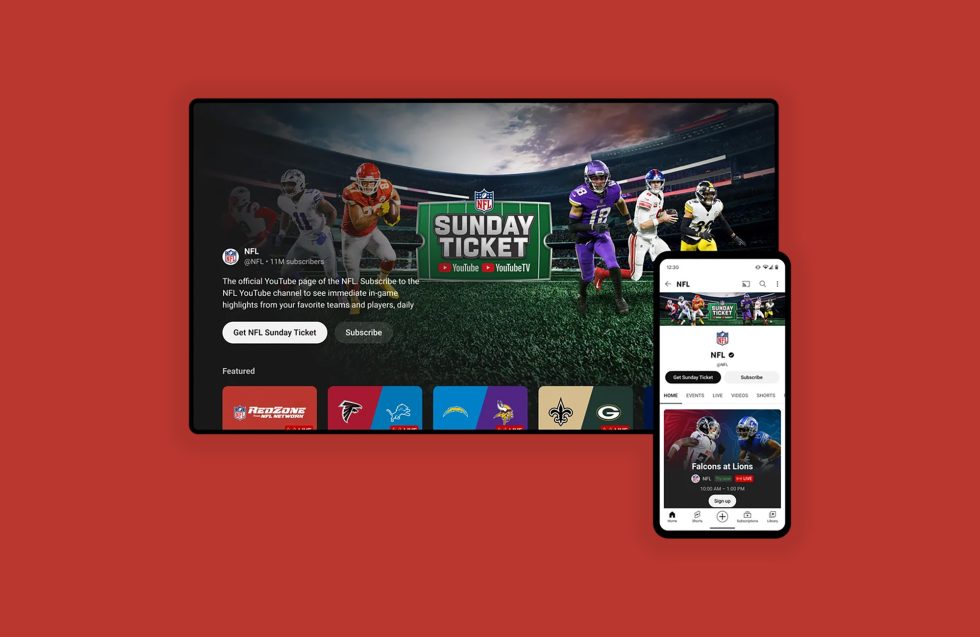
Once you’ve successfully set up NFL Sunday Ticket on YouTube, it’s time to learn how to navigate the interface. A smooth viewing experience can make all the difference, so let’s dive into the features you’ll encounter.
Upon accessing NFL Sunday Ticket within YouTube, you’ll notice a user-friendly layout designed for easy navigation. Here are the main sections you'll interact with:
- Home Screen: This is your landing page. You’ll find the current games being played, highlighted matchups, and quick access to schedules. It’s a great way to see what’s happening at a glance!
- Game Schedule: Click on this section to view upcoming games for the week. Each game will display information like the teams playing, kickoff time, and broadcast channel. You can even set reminders for games you don’t want to miss!
- Live Games: Want to jump straight into the action? The live games section will show you all ongoing games. Just click on any game to start watching. You’ll have options for different camera angles, which is pretty cool!
- Highlights: Missed a game or want to relive the best moments? The highlights section is perfect for catching up. It features top plays, game summaries, and player highlights. You can watch them any time!
- Settings: Adjust your preferences here. Whether it’s enabling notifications for game starts or customizing your video quality, the settings menu is where you make your viewing experience your own.
As you explore the interface, take your time to familiarize yourself with all its features. YouTube’s layout is intuitive, so you’ll be navigating like a pro in no time!
Whether it’s your favorite team’s game day or you’re catching up with highlights, the NFL Sunday Ticket on YouTube offers a seamless experience that keeps you connected to the action.
Also Read This: What Should Be My First YouTube Video
5. Tips for Enhancing Your Viewing Experience
Watching NFL games through Sunday Ticket on YouTube can be a thrilling experience, but there are a few tips you can follow to elevate that experience even further. Here are some suggestions to make sure you’re getting the most out of your viewing:
- Optimize Your Internet Connection: A fast and stable internet connection is crucial for streaming. Aim for at least 25 Mbps for a smooth experience. If possible, connect your device directly to your router using an Ethernet cable to reduce lag.
- Use a Compatible Device: Make sure you're watching on a compatible device—smart TVs, streaming devices like Roku or Fire Stick, or even game consoles work great. This ensures you have access to all features without any hiccups.
- Adjust Display Settings: Don’t forget to tweak your TV settings! Enable game mode for reduced input lag, and adjust the brightness and contrast to enhance the visuals. This can make the colors pop, especially during those dramatic game moments.
- Engage with Friends: Watching games alone can be fun, but sharing the experience with friends elevates it! Consider hosting a watch party, either in-person or through video calls, where everyone can enjoy the action together, even if they’re miles apart.
- Explore Interactive Features: YouTube often has interactive features like live chats or polls during games. Engage with other fans or participate in polls for a more immersive experience. It’s a great way to share excitement or vent frustrations in real-time!
By following these tips, you’ll ensure that your NFL Sunday Ticket experience on YouTube is not just good, but spectacular. Now, let’s address something that might pop up during your viewing—
6. Troubleshooting Common Issues
Even the best streaming services can encounter issues from time to time. If you run into problems while watching NFL Sunday Ticket on YouTube, don’t worry! Here are some common issues and how to troubleshoot them:
- Buffering or Lagging: If your stream is buffering constantly, check your internet speed. If it’s below the recommended 25 Mbps, consider closing other apps or devices using bandwidth. Restarting your router can also help!
- Stream Not Available: Sometimes, you might see a message that a game is unavailable. This can be due to regional restrictions. Double-check your location settings and make sure you’re logged into the correct account associated with your subscription.
- Audio Issues: If you can’t hear the commentary, check your device’s volume settings first. If that’s fine, try disconnecting and reconnecting your audio device (like Bluetooth headphones). Sometimes, a quick reset can work wonders!
- App Crashing: If the YouTube app crashes frequently, try clearing the app’s cache or uninstalling and reinstalling it. This often resolves glitches and ensures you’re running the latest version of the app.
- Login Problems: If you’re having trouble logging in, ensure you’re using the correct email and password associated with your Sunday Ticket account. If you’ve forgotten your password, use the “Forgot Password” feature to reset it.
By keeping these troubleshooting tips in mind, you’ll be better equipped to handle any issues that arise during your NFL Sunday Ticket viewing sessions. Happy watching!
 admin
admin







