Reporting a YouTube channel can feel overwhelming, especially when using a mobile device. Whether you’ve come across content that’s inappropriate or violates YouTube’s guidelines, knowing how to report it safely is essential. In this guide, we’ll walk you through the process step-by-step, ensuring that your concerns are heard while keeping your experience smooth and secure.
Understanding YouTube's Reporting Policies
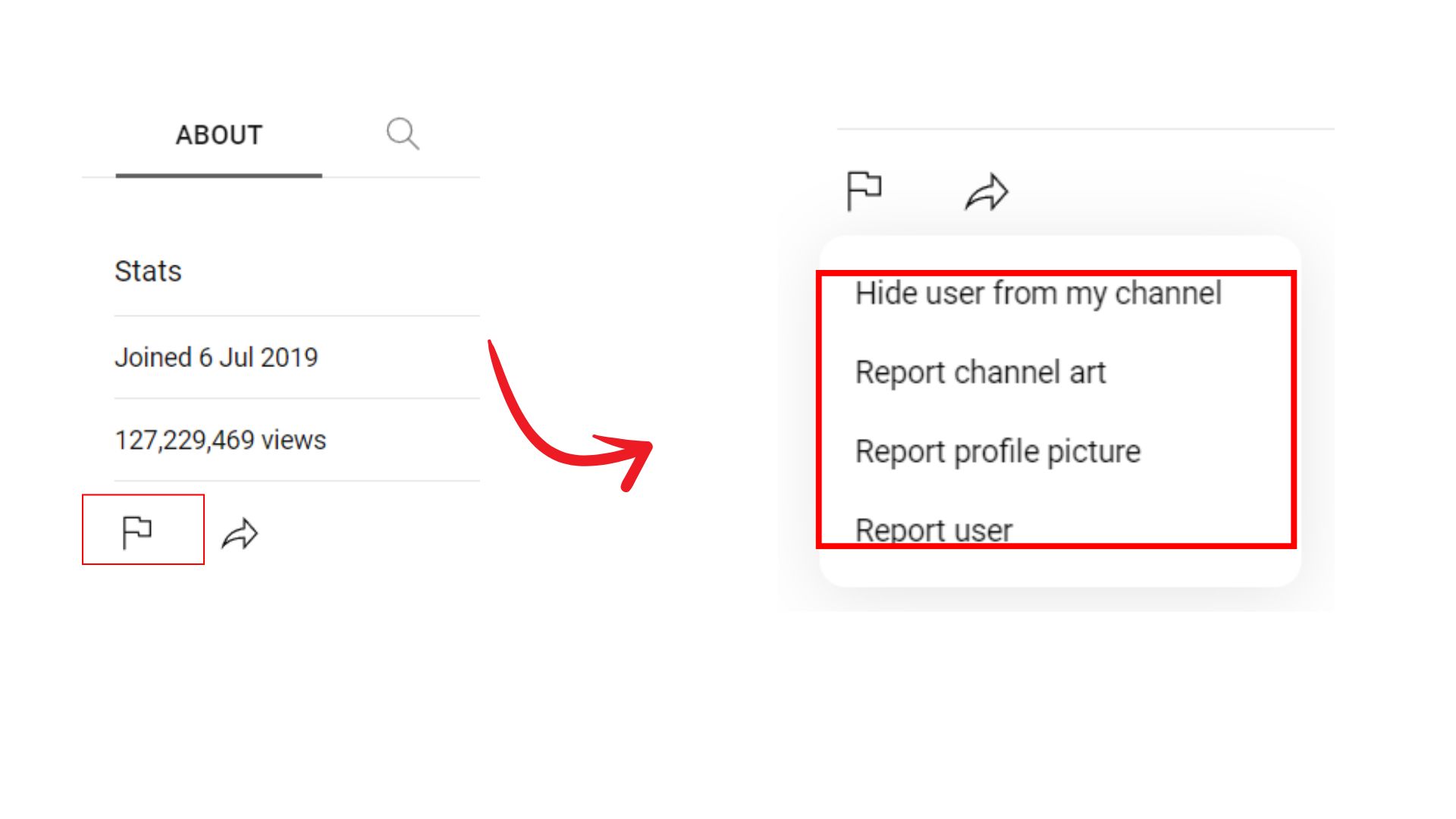
YouTube has established clear reporting policies to maintain a safe and respectful community. It’s crucial to understand these guidelines before you proceed with reporting a channel. Here's a breakdown of what you need to know:
Types of Violations
- Hate Speech: Content promoting violence or hatred against individuals or groups based on attributes like race, gender, or religion.
- Harassment: Videos that bully, threaten, or harass individuals.
- Spam: Channels that post misleading content or excessive self-promotion.
- Child Safety: Any content that exploits or endangers children.
- Copyright Infringement: Unauthorized use of copyrighted material.
When considering a report, ask yourself if the content truly violates these policies. YouTube often reviews reports, so providing clear and honest feedback is essential.
What Happens After Reporting?
Once you've submitted a report, YouTube’s team will review it. Here’s what typically happens:
- Your report is assessed based on the severity of the violation.
- YouTube may take actions such as removing the video, issuing warnings, or even terminating channels that break rules repeatedly.
- You will receive a notification regarding the outcome of your report, but specific details may not be disclosed for privacy reasons.
Remember, reporting should not be used lightly. Misuse of the reporting feature can lead to consequences for your account. Always ensure that your motivation for reporting is rooted in genuine concern for community safety.
In conclusion, understanding YouTube's reporting policies is vital for anyone looking to report a channel. By knowing what constitutes a violation and following the correct procedures, you contribute to a safer online environment for everyone.
Also Read This: How to Sign Out of YouTube TV on Your Phone and Secure Your Account
3. Steps to Report a YouTube Channel on Mobile Devices
Reporting a YouTube channel from your mobile device is a straightforward process, but it’s essential to follow the steps carefully to ensure your report is valid. Here’s how to do it:
- Open the YouTube App: First, make sure you have the YouTube app installed on your mobile device. Launch the app and log in if you haven’t already.
- Find the Channel: Use the search feature to locate the channel you want to report. You can do this by typing the channel name in the search bar at the top.
- Go to the Channel Page: Once you find the channel, tap on it to open the channel page. Here, you’ll see all the videos and details related to that channel.
- Access the Channel Menu: Look for the three vertical dots (⋮) located at the top right corner of the screen. Tapping this will open a dropdown menu with various options.
- Select 'Report': From the dropdown menu, tap on 'Report'. This will take you to the reporting interface where you can specify the reason for your report.
- Choose Your Reason: You’ll be presented with various options for why you’re reporting the channel. This may include reasons like spam, copyright infringement, harassment, or inappropriate content. Select the reason that best fits your situation.
- Add Comments (Optional): Depending on the reason you selected, you might have the option to add comments or provide additional context. This can be helpful for the review team, so don’t hesitate to include any relevant details.
- Submit Your Report: After filling out the necessary information, tap on the 'Submit' button. You should receive a confirmation that your report has been submitted successfully.
And that’s it! You’ve reported the channel from your mobile device. It’s important to remember that YouTube reviews all reports, but you might not receive feedback regarding the outcome due to privacy policies.
Also Read This: How to Delete YouTube from Smart TV and Remove the App Completely
4. What to Include in Your Report
When reporting a YouTube channel, providing clear and detailed information can significantly enhance the effectiveness of your report. Here’s what to consider including:
- Specific Violations: Be as precise as possible about what the channel is doing that violates YouTube’s policies. For example, if it's promoting hate speech, mention specific videos or comments that illustrate this behavior.
- Examples: If you can, include links to specific videos or timestamps that showcase the inappropriate content. This evidence can help the review team understand the issue better.
- Context: Provide context for your report. Are you reporting due to personal experience, or have you noticed a pattern of behavior over time? Briefly explaining your perspective can be useful.
- Contact Information (Optional): If you feel it’s necessary, you can provide your contact information for follow-up. However, keep in mind that this is optional and may not always be necessary.
Remember, reporting a channel should be done thoughtfully and responsibly. Misuse of the reporting system can lead to account penalties, so ensure your report is valid and based on genuine concerns. The goal is to maintain a safe and respectful community on YouTube!
Also Read This: How Much Money Is 20 Million Views on YouTube? Calculating Revenue for Videos with 20 Million Views
5. Common Mistakes to Avoid When Reporting
Reporting a YouTube channel can feel like a daunting task—especially when you're using a mobile device. To ensure your report is effective and taken seriously, it's important to avoid some common pitfalls. Here are a few mistakes to steer clear of:
- Not Providing Enough Detail: When filling out the report form, remember that details matter! If you do not explain why you believe the channel violates YouTube's guidelines, your report may not have the impact you want. Be specific about the issues you’ve noticed.
- Reporting for Personal Reasons: It's crucial to keep your objective clear. Reporting a channel simply because you disagree with its content or because of personal grievances can lead to a misuse of the reporting system. Stick to factual violations!
- Ignoring YouTube's Policies: Familiarize yourself with YouTube’s community guidelines before making a report. If you're unsure whether the content violates any rules, take a moment to review those guidelines. Reporting something that isn't against the rules can waste your time and confuse the review team.
- Submitting Multiple Reports: While it might seem like a good idea to submit several reports for the same issue, this can actually dilute the effectiveness of your original report. Focus on crafting one comprehensive report rather than bombarding the system with multiple submissions.
- Rushing the Process: Take your time when reporting. Hastily filling out the report can lead to mistakes or missing important information. A well-thought-out report is much more likely to result in action.
By avoiding these common mistakes, you'll increase the chances that your report will be taken seriously and addressed appropriately. Remember, your goal is to help create a safer and more welcoming environment on YouTube!
6. Follow-Up Actions After Reporting
So, you've successfully reported a YouTube channel using your mobile device—great job! But what do you do next? Here are some follow-up actions to consider:
- Monitor the Situation: After reporting, keep an eye on the channel in question. Are there any changes in their content? Has their posting frequency altered? This can give you insights into whether your report has prompted any action.
- Be Patient: Remember, YouTube receives a massive number of reports every day. It can take time for them to review and act on your report. Don’t lose hope if you don’t see immediate results!
- Engage with the Community: If you feel passionate about the issues you reported, consider engaging in discussions in the comments or forums. Sharing your experience can help others who may be facing similar situations.
- Report Again if Necessary: If you notice that the offending content persists or escalates, don’t hesitate to report it again. Use any new evidence to strengthen your case.
- Consider Alternative Actions: If the channel continues to violate guidelines after reporting, you may want to explore other options, such as sharing your concerns with other users or even contacting relevant authorities if the situation warrants it.
In summary, reporting a YouTube channel is just the first step. By taking thoughtful follow-up actions, you contribute to a healthier online community. Keep advocating for safe spaces on YouTube and stay engaged!
 admin
admin







