If you love watching videos on Dailymotion, you might sometimes wish you could save them to your computer for offline enjoyment. Fortunately, there are some easy and effective methods to download Dailymotion videos. In this post, we'll explore various solutions that can help you get your favorite content directly to your device. Let’s dive into how you can start downloading videos without any hassle!
Understanding Dailymotion Video Downloads
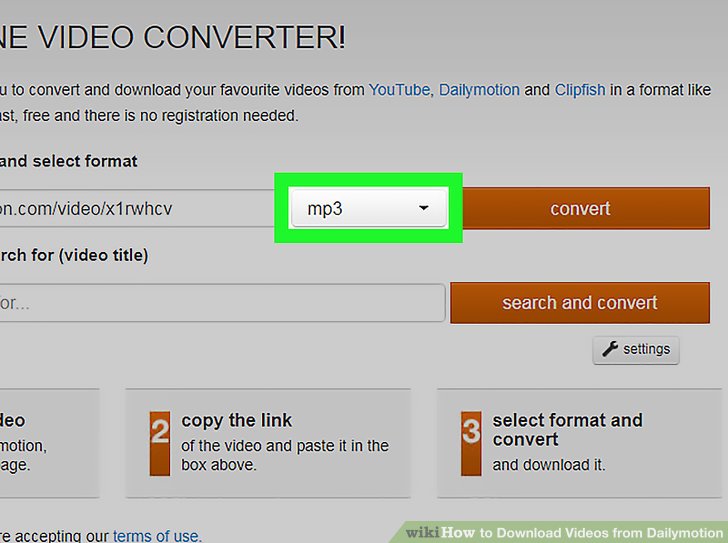
Downloading videos from Dailymotion may seem tricky at first, but once you grasp the basics, it becomes a breeze! Here’s what you need to know:
1. Why Download Dailymotion Videos?
- Offline Viewing: Enjoy your favorite videos without an internet connection.
- Storage: Keep a personal collection of videos for easy access.
- Sharing: Share downloaded videos with friends who may not have internet access.
2. Legal Considerations:
Before diving into the downloading process, it’s crucial to be aware of the legal implications. Most videos on Dailymotion are protected by copyright. Always check the terms of use and ensure that you have permission to download the content. If it’s your own video or one released under a Creative Commons license, you’re in the clear!
3. Different Methods to Download:
There are various methods to download Dailymotion videos, each with its pros and cons. Here are a few popular ones:
- Online Video Downloaders: Websites like Dailymotion Video Downloader allow you to paste the video link and download it directly. This method is user-friendly but can be limited by file size and quality.
- Browser Extensions: Extensions such as Video DownloadHelper for Chrome and Firefox make downloading seamless. They integrate directly with your browser and can detect videos on any webpage.
- Dedicated Software: Tools like 4K Video Downloader offer more robust features, allowing batch downloads and various format options. It’s worth the investment if you download often.
4. Step-by-Step Guide:
Let’s break down a simple method using an online downloader:
- Go to Dailymotion and find the video you want to download.
- Copy the video URL from your browser's address bar.
- Visit an online downloader site.
- Paste the URL into the provided box.
- Select your desired video quality and format.
- Click the download button, and voilà! Your video will start downloading.
By understanding these aspects of Dailymotion video downloads, you'll be well-equipped to enjoy your favorite content at your convenience. Whether you prefer a quick online tool or a more comprehensive software solution, there’s a method out there that will suit your needs perfectly!
Also Read This: How to Use Dailymotion for Learning, Inspiration, and Relaxation
3. Legal Considerations for Downloading Videos
When it comes to downloading videos from platforms like Dailymotion, it's essential to tread carefully in the legal landscape. Understanding copyright laws can save you from potential headaches down the road. Here are some key points to consider:
- Copyright Ownership: Most videos on Dailymotion are protected by copyright. This means that the original creator holds the rights to the content. Downloading and using these videos without permission can infringe on their rights.
- Fair Use Doctrine: In certain cases, you might be able to argue fair use, especially if you're using the video for educational purposes, commentary, or criticism. However, this is a grey area, and it’s best not to rely on it without proper legal advice.
- Terms of Service: Always check Dailymotion’s Terms of Service. They typically prohibit downloading content unless a download button is explicitly provided by the platform.
- Personal Vs. Commercial Use: Downloading videos for personal use may be viewed differently than downloading them for commercial purposes. If you plan to publish the video or use it in a commercial project, it's crucial to seek permission from the creator.
To put it simply, while it might be tempting to hit that download button, make sure you’re aware of the implications. If in doubt, reaching out to the video owner for permission is a safe bet!
Also Read This: The Evolution of Music Lyrics and Parodies on Dailymotion
4. Method 1: Using Online Video Downloaders
If you’re looking for a straightforward way to download Dailymotion videos, online video downloaders are your best bet! These tools are user-friendly and typically don’t require any software installation. Let’s break down the process:
- Choose a Reliable Online Downloader: There are many options available. Websites like SaveFrom.net, DVDVideoSoft, and Y2Mate are popular choices. Make sure to select one that has good reviews and a simple interface.
- Copy the Video URL: Go to Dailymotion, find the video you want, and copy its URL from the browser’s address bar. It's as easy as right-clicking the address and selecting "Copy."
- Paste the URL: Head over to the chosen downloader website. Look for a text box where you can paste the URL. Click on the box and press "Ctrl + V" (or "Cmd + V" on Mac) to paste the link.
- Select Video Quality: Many online downloaders let you choose the quality of the video you want to download. Whether you want HD or a lower resolution, select what works best for you.
- Click Download: After setting your preferences, look for the download button and click it. The site will process your request, and soon you’ll see a download link. Click that, and voila! Your video will start downloading to your computer.
Using online video downloaders is often a hassle-free solution. However, be cautious of ads or pop-ups that might pop up during the process—making sure your device is equipped with a robust ad-blocker can save you time and frustration!
Also Read This: Watch How to Make Pizza Dough in Urdu: Video on Dailymotion
5. Method 2: Software Applications for Video Downloads
If you're looking for a reliable and efficient way to download Dailymotion videos, software applications can be a fantastic option. These programs often come with additional features that can enhance your downloading experience. Here are some popular software applications to consider:
- 4K Video Downloader: This user-friendly software allows you to download videos, playlists, channels, and subtitles from Dailymotion in high quality. Just copy the video link, click "Paste Link" in the app, and choose your preferred format and resolution. Simple and effective!
- YTD Video Downloader: Known for its versatility, YTD supports multiple sites including Dailymotion. It offers a straightforward interface where you can paste the video URL to download it. Plus, it converts videos into various formats!
- Freemake Video Downloader: This tool is perfect for those who want to download videos in bulk. You can download entire playlists or channels with just a few clicks. The software supports a variety of formats, making it easy to find the right one for your needs.
When choosing a software application, consider the following:
- User Interface: Look for a clean, intuitive layout that makes navigation easy.
- Format Options: Ensure the software supports the video formats you prefer.
- Speed: Download speeds can vary, so consider software that is known for faster downloads.
- Updates: Regular updates can help the software adapt to changes on Dailymotion's platform.
With these software applications, downloading Dailymotion videos on your computer can be a breeze. Just select your favorite, follow the prompts, and enjoy your videos offline!
Also Read This: Practical Methods to Slim Down Hips in 10 Days Naturally
6. Method 3: Browser Extensions
If you prefer a solution that integrates seamlessly with your browsing experience, using browser extensions is a great choice. These handy tools allow you to download Dailymotion videos directly from your browser without needing to switch to a separate application. Here are a few popular browser extensions you might find useful:
- Video DownloadHelper: This extension is a favorite among users for its versatility. It detects videos on a webpage and provides download options in various formats. It's available for both Chrome and Firefox, making it widely accessible.
- Dailymotion Video Downloader: Specifically designed for Dailymotion, this extension simplifies the downloading process. Once installed, you can download videos with a single click when browsing Dailymotion.
- Flash Video Downloader: Another solid option, this extension supports multiple video sites, including Dailymotion. It allows you to download different video qualities and formats, tailored to your needs.
To add a browser extension, follow these steps:
- Go to your browser's extension store (Chrome Web Store or Firefox Add-ons).
- Search for your desired video downloader extension.
- Click "Add to Browser" or "Install" and follow the prompts.
- Once installed, visit Dailymotion, and you should see the extension icon ready for action!
Keep in mind that while browser extensions are convenient, they can sometimes be subject to compatibility issues with browser updates or changes in Dailymotion’s format. Regularly updating your extensions can help keep things running smoothly.
In conclusion, whether you opt for software applications or browser extensions, both methods provide easy solutions for downloading Dailymotion videos. Choose the one that fits your style, and enjoy your favorite content anytime!
Also Read This: How to Find Deleted Videos on Dailymotion
7. Troubleshooting Common Download Issues
Even the smoothest processes can hit a snag now and then, right? If you're trying to download Dailymotion videos and encountering issues, don’t worry! Here are some common problems and their easy fixes:
- Video Not Downloading: Sometimes, the link may not work. Double-check the URL you’re using. Ensure it’s a direct link to the video, not just the page URL.
- Slow Download Speeds: If your downloads are sluggish, check your internet connection. A quick speed test can help. If your connection is fine, try using a different time of day to download when networks may be less congested.
- Incompatible Formats: If the downloaded video doesn’t play, it might be in a format your player can’t handle. Convert the video using tools like HandBrake or VLC Media Player to ensure compatibility.
- Software Crashes: If the downloading software crashes frequently, consider updating it to the latest version. Outdated software can cause various bugs and glitches.
- Missing Video Quality Options: If you can’t find your desired quality settings, ensure you're using a reliable downloader. Some tools might not support high-quality downloads due to restrictions.
If you continue experiencing issues, visiting forums or the help section of your chosen downloading tool can provide additional insights. Remember, technology can be tricky, but with a little patience, you’ll be back to downloading in no time!
8. Tips for Choosing the Right Download Method
Choosing the right method to download Dailymotion videos can make all the difference in your experience! Here are some helpful tips to guide you:
- Assess Your Needs: Consider why you want to download the video. Is it for offline viewing, or do you plan to edit it? Understanding your purpose can help you choose a method that fits best.
- Research Options: There are numerous tools available, each with unique features. Look for user reviews or recommendations to find a trusted downloader that suits your needs.
- Check for Features: Some downloaders allow you to select video quality, audio formats, or even extract audio only. If these features are important to you, ensure your chosen method supports them.
- Read the Fine Print: Some downloaders may have restrictions or require payment for premium features. Make sure you understand any potential costs before committing to a tool.
- Test Different Methods: Don’t be afraid to experiment! Try a couple of different downloaders to see which one works best for you. Sometimes, personal preference plays a significant role.
In the end, the right download method will enhance your experience. Keep these tips in mind, and you’ll be well on your way to enjoying your favorite Dailymotion videos offline!
 admin
admin







