Changing your name on LinkedIn might seem like a small task, but it can have a significant impact on your professional presence. Whether you're married, divorced, or simply want to go by a different name, updating your LinkedIn profile is essential for reflecting your current identity. In this guide, we'll walk you through the reasons for making this change and the steps to do it seamlessly. Let’s dive in!
Why You Might Want to Change Your Name on LinkedIn
There are several compelling reasons you might consider changing your name on LinkedIn. Here are a few common scenarios:
- Marriage or Divorce: If you've tied the knot or decided to part ways, updating your surname is a vital step in reflecting your new status.
- Rebranding Yourself: Perhaps you’ve chosen to use a professional name or a stage name in your industry. This can help in creating a consistent brand across platforms.
- Privacy Concerns: You may want to limit the visibility of your full name for personal reasons, opting for a nickname or initials instead.
- Career Transition: If you’ve switched fields or industries, a name change can signal this transition and align you with your new professional identity.
Let’s explore each of these scenarios further:
Marriage or Divorce
When you get married or divorced, your name often changes. Updating your LinkedIn profile to reflect this change is important for networking. For instance, if you were known in your industry by your maiden name, consider including it in your profile summary to ensure people can still find you.
Rebranding Yourself
Using a professional name can enhance your brand identity. For example, if you’ve always gone by “Chris” in your personal life but prefer “Christopher” in your professional life, making this change can help colleagues and clients recognize your professional persona. This is particularly useful for creatives in fields like writing or music, where branding is key.
Privacy Concerns
In today’s digital age, protecting your privacy is paramount. If you're uncomfortable sharing your full name for security reasons, using a shortened version or an initial can be a smart move. Just ensure it’s still professional and recognizable within your industry.
Career Transition
If you’re making a significant career shift, a name change can help establish your new path. For instance, if you’ve moved from marketing to tech, updating your profile with your new name can align your past experiences with your current ambitions. It signals to your network that you’re evolving and ready for new opportunities.
Ultimately, changing your name on LinkedIn isn’t just about aesthetics; it’s about authenticity and ensuring that your professional identity mirrors who you are today. Whether for personal reasons or professional strategy, updating your name is a vital step in maintaining your LinkedIn presence.
Also Read This: How to Get Verified on LinkedIn: Steps to Earn the Verification Badge
3. Step-by-Step Guide to Changing Your Name on LinkedIn
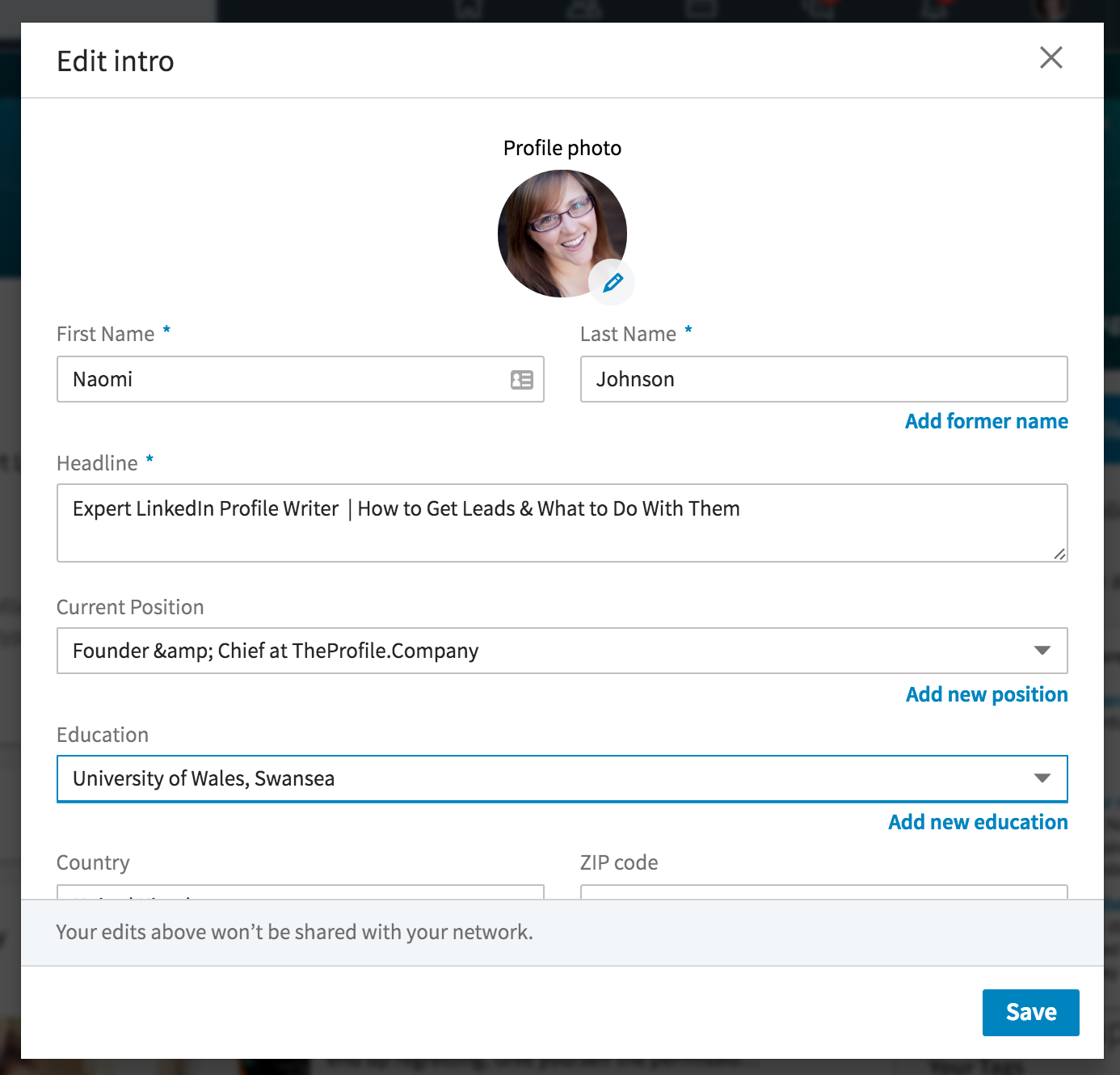
Changing your name on LinkedIn is a straightforward process that can help you better align your professional identity with your current career path or personal preference. Follow these simple steps to make the change:
- Log into Your LinkedIn Account: Start by signing in to your LinkedIn account. If you’re not already on your profile page, click on your profile picture or the “Me” icon at the top of the homepage.
- Go to Your Profile: Once on your profile, look for the “Edit Profile” or “Edit” button, typically represented by a pencil icon near your profile picture.
- Edit Your Name: In the profile editing section, you’ll find your name displayed at the top. Click on the pencil icon next to your name to enable editing.
- Enter Your New Name: Here, you can enter your new first and last name. Make sure it reflects how you want to be recognized in a professional setting. LinkedIn allows you to use up to 20 characters for your first name and 40 for your last name.
- Check Your Display Name: LinkedIn offers an option to display your name in different formats, such as including your middle name or initials. Consider how you want your name to appear to others.
- Save Changes: Once you’re satisfied with your new name, click the “Save” button at the bottom of the edit window to apply the changes.
- Review Your Profile: After saving, take a moment to review your profile to ensure everything looks good. It’s also a great time to update your headline or summary to reflect any other changes related to your name.
And voilà! Your name on LinkedIn has been successfully updated. Remember that it might take a few moments for the change to appear across the platform, so don’t panic if it’s not instant.
Also Read This: How to Add a Promotion on LinkedIn
4. Tips for Choosing the Right Name Display on Your Profile
Choosing the right name display on your LinkedIn profile is more than just personal preference; it can impact your professional image and how others perceive you. Here are some tips to help you make the best choice:
- Use Your Professional Name: Consider using the name you go by in professional settings. If you’re known by a nickname or a different version of your name, use that to maintain consistency in your professional interactions.
- Include Your Credentials: If you have professional credentials, such as PhD or MD, think about including them after your name. This can enhance your credibility, especially in academic or medical fields.
- Avoid Unnecessary Nicknames: While it’s essential to be approachable, avoid using nicknames that might come off as unprofessional. Stick to a name that you would use in a formal context.
- Use a Middle Name or Initial: If you have a common name, adding your middle name or initial can help differentiate you from others. Just ensure it flows well with your first and last name.
- Consider Localization: If you are working in a bilingual environment or in a different country, consider how your name is perceived in that culture. Using the local format or translation can be beneficial.
- Check for Consistency Across Platforms: Ensure that your LinkedIn name aligns with how you present yourself on other professional platforms. This consistency helps in building a recognizable personal brand.
By carefully considering how you display your name on LinkedIn, you can create a strong professional identity that resonates with your audience and reflects your career aspirations.
Also Read This: How to Find Recruiters on LinkedIn Effectively
5. Common Issues and How to Resolve Them
Changing your name on LinkedIn should be a straightforward process, but sometimes, you might encounter a few hiccups along the way. Here are some common issues people face and how to resolve them:
- Verification Delays: Sometimes, LinkedIn may require verification of your name change for security reasons. If this happens, don’t panic! You can expedite the process by completing the verification steps promptly. Check your email for any messages from LinkedIn, and follow the instructions provided.
- Name Change Restrictions: LinkedIn has guidelines about how often you can change your name. If you recently updated your name, you might have to wait before making another change. To avoid this, plan your name change carefully and ensure it reflects your professional identity accurately.
- Profile Visibility Issues: After changing your name, some users report that their profile doesn’t update immediately in searches. This could be due to LinkedIn's indexing delays. To resolve this, try logging out and back in or clearing your cache. If the issue persists for more than a few days, reach out to LinkedIn's support.
- Friends and Connections Confusion: When you change your name, especially if it’s significantly different, some connections might get confused. To mitigate this, consider posting an update on your feed explaining the change. This not only clears up confusion but also helps maintain your professional presence.
- Not Seeing Your Preferred Name Format: If you want your name displayed in a specific format (e.g., including a middle name or initials), but LinkedIn doesn’t allow it, try using the 'Former Names' section. This way, your preferred name can still be visible to connections, ensuring they know how to address you.
Remember, while these issues can be frustrating, they’re often easy to resolve with patience and a little effort. If you find yourself stuck, LinkedIn's help center is a treasure trove of information, usually ready to assist you further.
6. Conclusion
Changing your name on LinkedIn is not just about updating a field; it’s about maintaining your professional identity and ensuring that your connections can find you easily. Whether you’re married, divorced, or simply want to go by a different name professionally, LinkedIn provides a user-friendly way to make those changes.
As you navigate the name change process, remember to:
- Double-check your settings to ensure your name appears as you wish.
- Be aware of any common issues and how to resolve them.
- Communicate with your network about your name change to avoid any confusion.
In the end, your LinkedIn profile is a reflection of who you are professionally. Keeping your information up to date helps you maintain your credibility and ensures that your connections can engage with you seamlessly.
So go ahead, make that change with confidence! Your professional journey is uniquely yours, and your name is a significant part of that narrative. Happy networking!
 admin
admin







